
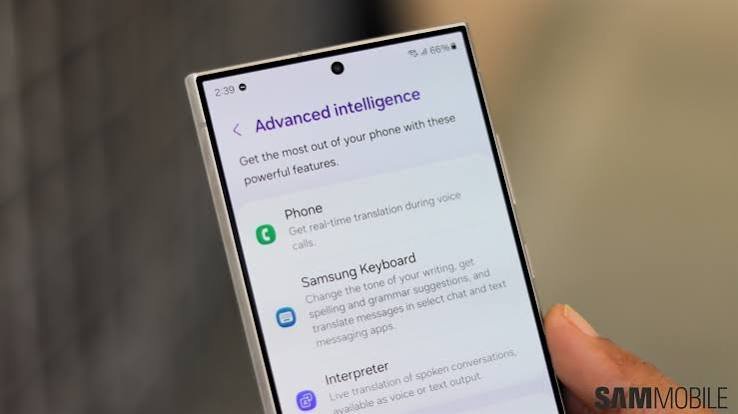
AI-powered smartphones are becoming increasingly common, but not every device supports advanced on-device artificial intelligence. This guide explains how to check AI capabilities before buying a smartphone, helping Indian consumers choose a device that will remain useful for years.
The topic is evergreen with current relevance. AI features continue to evolve as smartphone brands release new software updates and hardware. However, the methods for evaluating AI capabilities before purchasing remain applicable across brands and models.
How to Check If Your Smartphone Supports the Latest AI Features Before Buying
Knowing how to check if your smartphone supports the latest AI features before buying has become more important than ever. Artificial intelligence is no longer limited to flagship smartphones. Brands across different price segments now advertise AI cameras, AI photo editing, AI writing tools, live translation, voice assistants, and productivity features. However, not every AI feature works in the same way. Some require powerful hardware that runs AI directly on the phone, while others depend on cloud services and an internet connection. Understanding these differences helps buyers make a smarter purchasing decision and avoid paying extra for features they may never use.
Understand the Difference Between On-Device AI and Cloud AI
One of the first things buyers should verify is where the AI processing happens.
On-device AI runs directly on the smartphone using dedicated hardware. This allows faster performance, better privacy, and the ability to use many features without internet access. Examples include image enhancement, real-time language translation, voice transcription, and smart photo editing.
Cloud AI sends data to remote servers for processing before returning the results. While these features can be powerful, they usually require a stable internet connection and may process information outside the device.
Manufacturers often market both types simply as “AI features,” so reading the product specifications carefully is important before making a purchase.
Check the Processor and AI Hardware
The processor is one of the biggest factors that determines AI performance.
Modern smartphone chipsets include dedicated AI processing units, often called Neural Processing Units (NPUs), AI Engines, or Neural Engines depending on the manufacturer. These specialized components accelerate machine learning tasks while reducing battery consumption.
Recent flagship processors from Qualcomm Snapdragon, MediaTek Dimensity, Google Tensor, Apple A-series and Apple Silicon, and Samsung Exynos generally include advanced AI capabilities. Many upper mid-range processors now also offer dedicated AI acceleration.
Before buying, compare the processor model rather than relying only on marketing terms such as “AI smartphone.”
Verify Which AI Features Are Actually Available
Different smartphone brands offer different AI experiences.
Some phones focus on AI photography, automatically adjusting lighting, colors, and object recognition. Others emphasize productivity with AI writing assistance, document summarization, call transcription, live interpretation, or intelligent search.
Before purchasing, visit the manufacturer’s official product page and review the list of supported AI features. Do not assume that every phone from the same brand includes identical capabilities.
Also check whether certain AI functions are available only in specific countries or languages, as regional restrictions sometimes apply.
Confirm Software Update Support
AI features depend not only on hardware but also on software updates.
Manufacturers frequently introduce new AI tools through operating system updates rather than launching entirely new devices. Choosing a smartphone with several years of promised Android or iOS updates increases the likelihood of receiving future AI improvements.
Brands have gradually extended software support across many premium and mid-range models. Before buying, verify both the Android version or iOS version and the manufacturer’s update policy.
Longer software support improves security, performance, and access to newer AI capabilities.
Check RAM and Storage Requirements
Advanced AI applications require sufficient memory and storage.
Many AI-powered editing tools, language models, and productivity applications consume more RAM than traditional smartphone apps. Phones with higher RAM generally handle multitasking more efficiently when running AI features.
Storage is equally important because AI models, downloaded language packs, and editing tools occupy significant space. Buyers planning to use AI extensively should avoid choosing devices with very limited storage capacity.
Selecting a phone with enough RAM and internal storage also helps maintain performance over several years.
Read Independent Reviews Before Buying
Marketing materials often highlight only the strongest features of a smartphone.
Independent technology reviewers usually test AI performance in real-world situations. They evaluate photo editing, object removal, voice recognition accuracy, battery impact, translation quality, and overall speed.
Watching detailed reviews or reading trusted technology websites can provide a clearer understanding of how well the AI functions actually perform.
User reviews are also valuable because they reveal long-term software stability and whether promised AI features work consistently after updates.
Compare AI Features Across Brands
AI capabilities differ significantly between manufacturers.
Some brands prioritize photography with AI scene recognition and editing tools. Others focus on productivity, offering intelligent note-taking, document summarization, or writing assistance. Certain devices integrate AI deeply into the operating system, while others provide only a limited set of applications.
Instead of comparing only camera megapixels or display size, buyers should prepare a checklist of AI features they expect to use regularly. Choosing based on personal needs results in better long-term satisfaction than purchasing solely because of advertising claims.
Consider Privacy Before Using AI Features
Many AI functions process personal information such as photos, voice recordings, emails, or documents.
Before enabling AI services, review the privacy policy and understand whether data remains on the device or is transmitted to cloud servers. Smartphones that perform more AI tasks locally generally offer stronger privacy because less personal information leaves the device.
Users should also install software updates promptly to receive security improvements and protect AI-powered services from newly discovered vulnerabilities.
Takeaways
- Check whether AI processing happens on the device or through cloud services.
- Compare processors, RAM, storage, and software update commitments before buying.
- Verify the exact AI features available on the manufacturer’s official product page.
- Read trusted reviews to understand real-world AI performance instead of relying only on marketing claims.
Frequently Asked Questions
1. What is on-device AI in a smartphone?
On-device AI refers to artificial intelligence that runs directly on the smartphone using dedicated hardware, allowing faster processing, better privacy, and support for many features without an internet connection.
2. Does every AI smartphone have the same features?
No. AI capabilities vary widely between brands and models. Some focus on photography, while others provide productivity tools, language translation, voice assistance, or document editing.
3. Is a powerful processor important for AI features?
Yes. Modern processors with dedicated AI hardware can perform machine learning tasks more efficiently, improving speed, battery life, and overall user experience.
4. Should software update support matter when buying an AI smartphone?
Yes. Many new AI features are introduced through software updates. Choosing a phone with long-term update support increases the chances of receiving future AI improvements.